


A Shift Away From Smartwatches — And Back Again
For several years, my daily timepiece of choice was either a traditional analog watch or a simple fitness band like the Xiaomi Band 6. These options were sufficient for basic step counting and checking the time. A fully featured smartwatch never felt essential. I wasn’t highly active, constant notifications were unnecessary, and the idea of charging a watch every day was far from appealing.
That perspective changed this year with hands-on time using the Google Pixel Watch 4, a device that unexpectedly made smartwatches feel relevant again.
Circular Design That Stands Out
Round watch faces have always held strong appeal. One of the earliest smartwatches I owned was the Moto 360, and its circular design left a lasting impression. The Pixel Watch 4 builds on that legacy with a refined aesthetic that feels both modern and familiar.
The device features a curved domed Actua 360 display with slimmer bezels compared to its predecessor. While the 41mm model was used for testing, the 45mm variant would be the preferred choice for its larger screen and improved battery capacity.
Visibility is another highlight. With 3,000 nits of peak brightness, the display remains clear and readable even in direct daylight, a key usability improvement for everyday wear.
Battery Life and Charging: A Practical Advantage
Battery performance is where the Pixel Watch 4 truly excels. Even with the smaller 41mm model, it consistently delivered more than a full day of usage during lighter activity days.
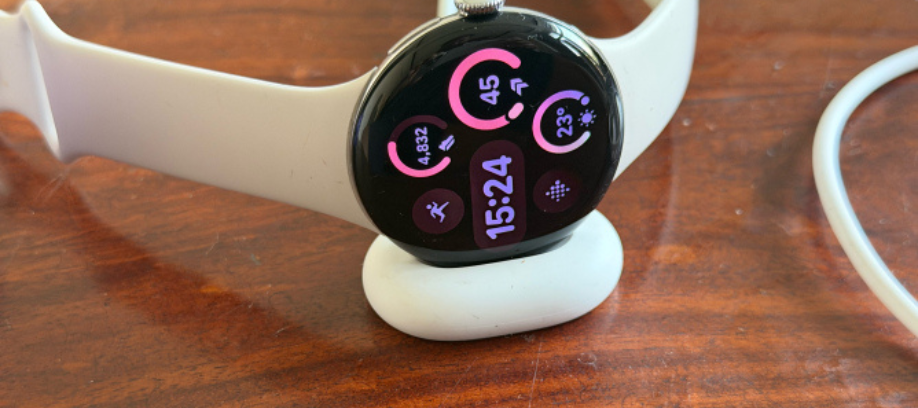
Although the watch uses a proprietary puck-style charger, charging speed compensates for this limitation. Google states that the watch can be charged from 0% to 50% in 15 minutes and from 0% to 100% in 45 minutes. While real-world results don’t match these figures exactly, charging times came very close.
This fast-charging capability significantly improves day-to-day convenience. Short charging sessions during routine tasks — such as making coffee or completing quick household chores — provide enough power to last the rest of the day.
Fitness Tracking: Strong Foundation, Limited Depth
Fitness tracking was primarily tested through walking, pickleball sessions, and recent gym workouts. While calorie tracking is reliable, the watch offers limited sport-specific insights for activities like pickleball.
Gym tracking is functional but not deeply specialized. Apart from treadmill and elliptical modes, users must rely on broader categories such as strength training, core workouts, or general exercise modes rather than equipment-specific options.
The watch does offer more advanced features for runners, though environmental factors — such as poor air quality — can limit real-world usability. Automatic cardio detection after 15 minutes of continuous activity works inconsistently, particularly during walks. Metrics like floor count also showed inaccuracies in everyday scenarios.
Sleep Tracking and Readiness: Room for Growth
Wearing a watch to sleep was not a long-standing habit. However, using the Pixel Watch 4 required a conscious effort to track sleep and readiness scores more consistently. Over time, nightly wear became routine.
That said, insights available directly on the watch remain limited. While the Fitbit app offers readiness-related suggestions, there are no additional actionable insights displayed in the daily on-watch summary. As competing fitness platforms increasingly integrate AI-driven analysis, this is an area where Google has clear room to improve.
Software Experience and Smart Features
Google’s updated Material UI brings a refreshed visual identity that aligns well with other Pixel devices. The weather app, in particular, stands out with clear and visually appealing hourly and daily forecasts.
There are minor usability drawbacks. The exercise app limits quick-start options to three workouts, which restricts flexibility. Voice interaction with Gemini works smoothly, but its practical use remains limited to tasks such as setting timers, checking sports updates, or starting workouts.
A recent software update introduced pinch gestures, allowing users to dismiss notifications, control media playback, or reject calls with simple wrist movements. This subtle feature significantly improves one-handed usability.
A Well-Rounded Upgrade
Despite minor shortcomings, none of the issues significantly affected daily use. The display quality is excellent, the overall software experience feels polished, and the refreshed design marks a clear improvement over the previous generation.
Ultimately, what makes the Pixel Watch 4 compelling is the balance between battery longevity and fast charging — a combination that removes one of the biggest barriers to smartwatch adoption.
Final Verdict
The Google Pixel Watch 4 successfully addresses many of the practical concerns that have held users back from embracing smartwatches. With strong hardware design, a bright and responsive display, dependable battery performance, and rapid charging, it stands out as one of the best Android smartwatches currently available.




0 Comments