


Mixup: Former Google Talent Introduces a Creative, Mad Libs-Style AI Photo App
A New AI Photo Playground from the Makers of Rooms
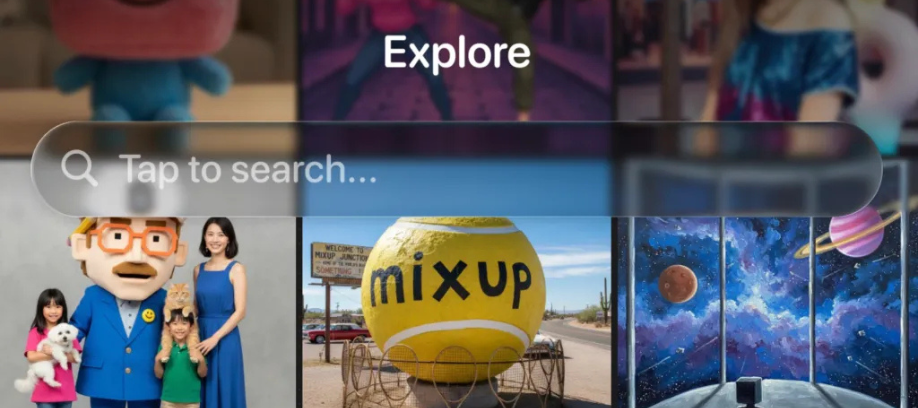
The team of ex-Googlers behind Rooms, the 3D design app from Things, Inc., has unveiled its newest experiment: Mixup, a light-hearted AI photo editor designed for playful image creation. Available exclusively on iOS, Mixup allows users to generate AI-driven photos through customizable “recipes” — simple, fill-in-the-blank prompts reminiscent of Mad Libs. These templates work with photos, text, or even rough sketches to produce imaginative results.
Users can experiment freely: sketch something and transform it into a Renaissance-style artwork, give a pet a humorous Halloween makeover, try out different hairstyles using a selfie, or create intentionally absurd images — even “envisioning a friend transformed into the form of Italian brainrot.”
Mixup is powered by Google’s Nano Banana model, but its “recipe” interface offers a more approachable way to interact with advanced generative AI, framing it almost like a collaborative party game.
“A Convincing Way That Wasn’t Creepy”: How Mixup Handles Your Images
“The thing that [Nano Banana] did that no model did before was that it could take your image and maintain it in a convincing way that wasn’t creepy,” explained Jason Toff, founder and CEO of Things, Inc. Toff previously worked across experimental product teams in Big Tech at Google, Meta, and Twitter.
What sets Mixup apart is the ability to share user-created recipes, turning creative prompts into reusable tools for others.
Removing the “Blank Page Problem” in Generative AI
According to Toff, many AI tools still struggle with accessibility:
“Generative AI is so powerful, and yet most of the time you go to these tools and it’s like, here’s your text box — come up with something creative. And what do you write?” he said.
Mixup aims to eliminate that barrier.
“And so, rather than having to be creative and think about what to create, you see something that worked, and you can just fill in the blanks,” Toff added.
Once a user creates a recipe, they can publish it—along with their resulting image—to a public feed, or simply save it privately. Other users can then tap “Try recipe” to recreate the prompt with their own inputs. Mixup also includes an in-app drawing tool for users who want to start with doodles.
Addressing AI’s “Slot Machine” Unpredictability
Generative image tools often produce inconsistent results, which Mixup tackles by showing the original image and the prompt side by side.
“Another problem [with generative AI] is what we were referring to internally as a ‘slot machine’ problem, where you push the button, something comes out, you push it again, something different comes out, and you don’t feel like you have control over the output,” Toff said.
To increase transparency, Mixup also allows users to toggle between before-and-after views—if the creator enables the feature.
Introducing “Mixables”: Letting Others Use Your Image
Similar to OpenAI’s Sora, Mixup allows users to upload personal photos, which can then be used by anyone they follow. This feature, called “mixables,” is intended to help groups of friends collaborate — though creators who enjoy unexpected mashups may also find it appealing. For those concerned about privacy, the solution is simple: don’t upload images, or avoid following others.
Built-In Moderation and Safety
Mixup relies on OpenAI technologies to help manage moderation risks, while also leveraging Google’s image model safety rules that restrict sensitive content such as violence or sexual imagery.
Pricing, Availability, and Launch Details
Mixup is optimized for iOS 26, but works on any device running iOS 18 or higher. A web or Android version may follow depending on demand.
The app launches globally on the App Store at midnight on November 21. Access requires an invite, though TechCrunch readers can use the code TCHCRH while supplies last. Mixup is also open for pre-order ahead of release.
Pricing Model
-
Free tier: 100 credits (valued at $4)
-
Cost per image: ~4 cents
-
Subscriptions: Monthly packages offering 100, 250, or 500 credits



0 Comments